ASUS X1404ZA Vivobook Internal Speaker Set Left Right
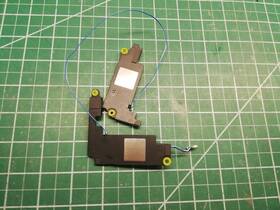
( Brand: Asus ), ( Manufacturer Part Number: X1404ZA ), ( Model: 14 X1404ZA ), ( Type: Speakers ), ( Connectivity: Wired )
Review ASUS Vivobook Internal Speaker Set Left Right
The ASUS VivoBook X1404za-MB004T internal speaker set is an essential addition to this sleek and versatile laptop, providing rich and immersive audio experience for your multimedia needs. The two built-in speakers are strategically positioned on the left and right sides of the laptop's base, ensuring optimal sound dispersion towards the user.
Each speaker is a high-performance, full-range design with a 1.5-watt (RMS) power output, delivering clear and powerful sounds for music, movies, videos, and virtual meetings. The speakers also support Stereo Waves MaxxAudio technology for enhanced audio effects and superior sound quality. The technology provides an expanded, more balanced sound with clearer dialogue, deeper bass, and crisper highs.
The speakers' dimensions are appropriately tailored to the laptop's form factor. Measuring approximately 14.2 x 8.9 x 0.8 inches (36.1 x 22.6 x 2 cm) each, they easily blend in with the laptop's design while providing an impressive listening experience. The speakers connect directly to your laptop, making setup a hassle-free process. Simply turn on your computer, and the speakers will automatically activate.
This speaker set is also energy efficient, with a low power consumption that won't drain your laptop's battery life, allowing you to enjoy your favorite media on the go without worrying about unexpected power losses. Overall, the ASUS VivoBook X1404za-MB004T internal speaker set is a compact and powerful solution that transforms your computing experience. Whether you're using your laptop for entertainment, productivity, or communication, you'll appreciate the improved audio quality and the enhanced overall value.
The ASUS VivoBook X1404ZA is a budget-friendly 14-inch laptop, and while it comes with built-in speakers, some users might consider purchasing external left and right speakers to enhance their audio experience for various reasons. Here are the potential advantages and disadvantages of buying external left and right speakers for the ASUS VivoBook X1404ZA.
Pros:1. Improved sound quality: External speakers can deliver better audio clarity, richer bass, and more volume than built-in laptop speakers. This can greatly enhance the user experience when watching movies, listening to music, or engaging in video conferencing.
2. Reduced distortion: External speakers can help reduce distortion and interferences that may occur when using the laptop's built-in speakers at high volumes or in noisy environments.
3. Wireless connectivity: External speakers with wireless connectivity, such as Bluetooth or Wi-Fi, can enable users to easily switch between devices or eliminate the need for cables, making the setup process more convenient.
4. Versatility: External speakers can be used not only for the ASUS VivoBook X1404ZA but also for other devices like smartphones, tablets, and gaming consoles, making them a versatile investment for multimedia use.
Cons:1. Additional cost: External speakers can come at an additional cost, especially if users opt for high-end models. The cost may vary depending on the brand, quality, and connectivity options.
2. Additional clutter: External speakers require an additional space on the desk or work area, adding to the cluttered setup. USB hubs or docking stations with built-in speakers can help minimize this issue.
3. Power consumption: External speakers consume additional power when in use, potentially adding to the overall power consumption of the laptop and requiring a power outlet to be available.
4. Cables and tangles: For wired external speakers, users need to manage cables and avoid tangles, which may require some additional effort and organization. Bluetooth or wireless speakers can help eliminate this nuisance.
Conclusion:Purchasing external left and right speakers for the ASUS VivoBook X1404ZA can provide significant advantages, such as improved sound quality, reduced distortion, wireless connectivity, and versatility. However, this investment comes with some disadvantages, such as additional cost, added clutter, power consumption, and cables, which users should weigh against the benefits before making a decision. Ultimately, if the user prioritizes high-quality audio performance and wants to enhance the multimedia experience on their ASUS VivoBook X1404ZA, investing in external speakers could be a worthwhile investment.
Recommendation:For budget-friendly external speakers with decent sound quality and wireless connectivity, consider exploring models from brands like Anker, JBL, or Logitech. These options offer an affordable price point while delivering satisfactory audio performance. Users who prefer wired solutions or require more advanced features can consider brands like Sony, Bose, or Creative, which offer a wider range of features and sound quality options. When selecting external speakers, consider factors such as connectivity (wired or wireless), compatibility, power consumption, size, and cost to find the best fit for your needs.
Details:
Found better price. Each sale comes with our quality guarantee.
part #: x1404za prices
- $8.50-$45.44
specifications computerspeakere:
- brand: Asus
- mpn: X1404za
- model: 14 X1404za
- type: Speakers
- connectivity: Wired
offer computerspeakere:
- sold: 0
- availability: In Stock
- options: Ship-to-home
- started: January 9, 2025
- quantity: 1
general computerspeakere:
- Computers/Tablet's Networking > Laptop Desktop Accessories > Computer Speakers
- condition: Used
seller computerspeakere:
- rating: 99.0%
- city: Champlain, New York
- # reviews: 33130
shipping computerspeakere:
- type: Fixed
- class: Economy, Expedited
- cost: $0.00
- transit: 5-8 Days
- service: Economy, Expedited
payments computerspeakere:
- wallet: Paypal
- other
- credit card: Diners-club
returns computerspeakere:
- method: Money back
- time: 30 Days
- paid by: Seller
- policy: Returns Accepted
Asus X1404ZA Is Similar To:
- 04072-01740000 Asus New C100pa Speaker (31.9% similar) Manufacturers part number may vary. Manufactures use many different model parts in the same computer and they are not all compatible with each other...(August 23rd, 2017)
- 13gnmm1ap050-1 Asus Rog Laptop Speaker Bar Hinge Cover (36.4% similar) Used part works...(June 26th, 2018)
- 13n1-0ba0d01 13n1-0ba0e01 Asus Rog Strix Left And Right Speakers Set (35.5% similar) Asus Roeg stria GL553VD left and right speakers set 13N1-0BA0D01 13N1-0BA0E01 all of our used parts are tested in working computers before they listed here for sale. In you ever need to return this part for any reason, be sure not remove the tamper proof warranty sticker or tag that contains serial ...(July 12th, 2018)
- 3jxkgaajn10 Asus Genuine Series Speaker Left And Right (49.1% similar) In you ever need to return this part for any reason, be sure not remove the tamper proof warranty sticker or tag that contains serial numbers. We help computer repair centers and private individuals to their computers save money avoid unnecessary electronic waste at the landfill. Please understand ...(September 23rd, 2018)
- A53e Asus Genuine Laptop Left And Right Speaker Set Speakers (37.9% similar) 6 genuine laptop left and right speaker set speakers condition: part, very good condition. For sale: Asus A53E 15. Actual item pictured...(September 3rd, 2018)
- 2.5mm Sonicmaster Asus Original Subwoofer Mini External Speaker For Zenbook (42.7% similar) ...(March 9th, 2016)
- Asussubwooferblack Asus Genuine Sonicmaster Subwoofer Speaker (29.1% similar) Look at pictures for details. Item is used and may have scuffs, scratches or signs of wear. Genuine Asus sonic master sub woofer speaker this listing is for. Item has been fully tested, inspected and is in good working condition...(October 20th, 2018)
- Dq60app6p93 Asus Genuine Series Laptop Internal Speaker Bar (43.5% similar) We help computer repair centers and private individuals to their computers save money avoid unnecessary electronic waste at the landfill. All the defects are mentioned in. 5 all electronic components are packed in anti-static bag. Please understand that, if a part does not fix your computer, that ...(August 14th, 2018)
- Et2322 Asus Aio Genuine Desktop Subwoofer Speaker (38.1% similar) Sub woofer speaker was tested and carefully removed from the working desktop. Actual item pictured. For sale: Asus ET2322 AI 23 genuine desktop sub woofer speaker condition: part, very good condition...(November 29th, 2018)
- G750jm-ds71 Asus Rog Genuine Laptop Subwoofer Speaker Glp (35.4% similar) 3 G750JM-DS71 genuine laptop sub woofer speaker glop item is in very good working and cosmetic condition. If for some reason you are not satisfied with received item, e-mail us through messages. Good luck buying. Actual item pictured. Make the best deals with us. Asus Roeg 17. Money back guaranteed...(July 15th, 2018)
- G75vw-ds72 Asus Rog Genuine Laptop Subwoofer Speaker (35.2% similar) Sub woofer speaker was tested and carefully removed from the working laptop. 3 genuine laptop sub woofer speaker condition: part, very good condition. Actual item pictured. For sale: Asus Roeg G75VW-DS72 17...(July 26th, 2018)